
Resurf: A fast, minimal "everything box" for capturing what matters

Most of our days look the same: Safari tabs breeding in the background, screenshots piling up on the desktop, a half‑written note in Apple Notes, a PDF we swear we’ll “deal with later.”
And then, of course, we can’t find any of it.
That’s the headspace we were in when we installed Resurf.
What’s Resurf?
Resurf’s promise is simple: a Mac‑first capture tool that becomes your personal library for links, notes, screenshots, files, and more—without switching apps or breaking your workflow.
Deep Lakhani, the Design Engineer building Resurf, puts it this way:
“Our vision with Resurf is to build a thinking tool: a second brain where ideas don’t get lost, but stay ready for when you need them.”
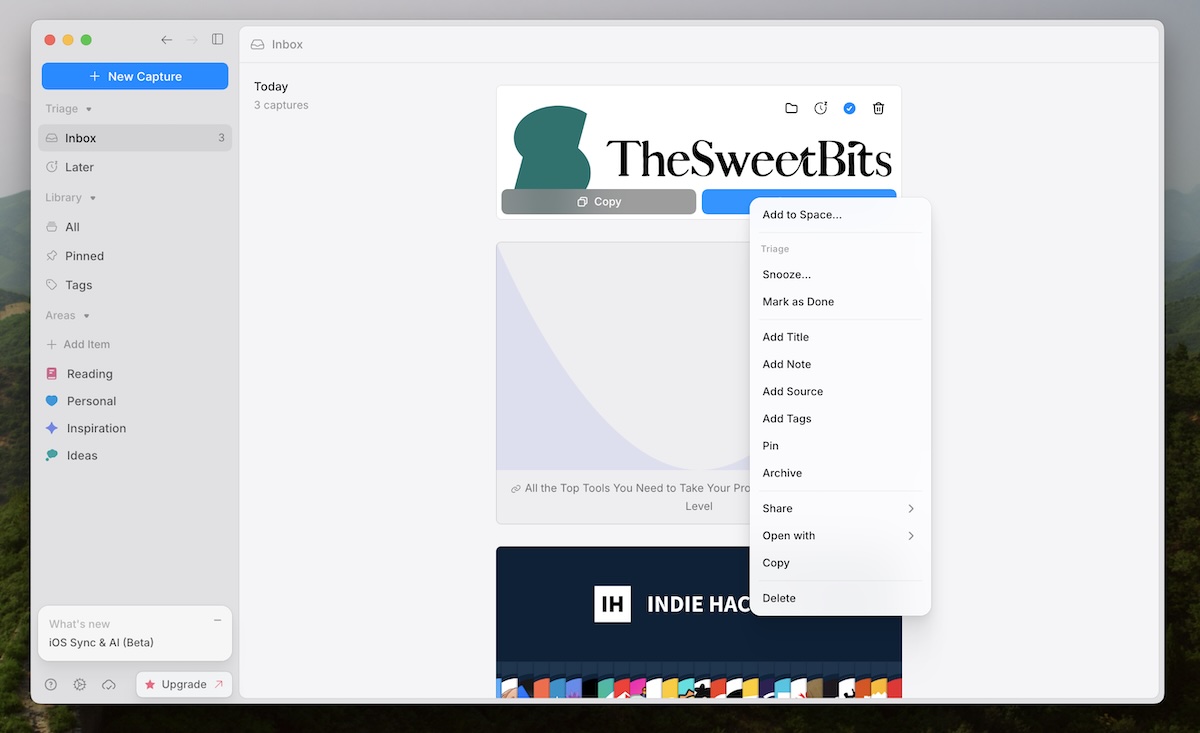

Capture
The first thing we noticed wasn’t a feature—it was the absence of friction.
Resurf lives where a Mac app should: a clean, minimal window, a menubar icon if you want it, and a global shortcut (by default ⌘⇧C) that works anywhere.
- Reading an article? Hit the shortcut, and Resurf grabs the link and lets you add a note.
- Skimming a PDF? Drag it in.
- Spot something worth saving in an email or chat? Select text, use macOS Services, and it appears in your library.
We’ve tried “everything boxes” before that promised to hold it all.
Resurf is one of the few that feels designed around the capture moment first—and the organization problem second.
Organization
Once we started throwing things into Resurf, the usual anxiety kicked in:
“Okay, but what happens when this gets full?”
Resurf answers that with a few thoughtful building blocks:
- Spaces for grouping related captures—work, personal, side project, research.
- Tags and smart filtering to slice through your pile when you’re hunting for “that one screenshot from last week.
- A built‑in Canvas view for visual thinkers, where notes, links, and images become little cards you can move around to map ideas.
It doesn’t try to be a full‑blown PKM system like Obsidian or Notion.
Instead, it feels like the missing layer that sits before those tools—the place where things land first, while they’re still fuzzy, still forming.
We found ourselves capturing more precisely because we weren’t being asked to “file” things perfectly on the spot.
Search
Over time, Resurf inevitably becomes a little museum of your brain.
That only works if you can get things back out.
Here, Resurf leans on a Spotlight‑style search (⌘⇧Space) that cuts across notes, links, files, and spaces.
Type a bit of a headline, a tag, a word you remember from a note—and items surface instantly.
Under the hood, it’s local‑first: your data lives on your Mac, with automatic backups and no required cloud account.
For anyone tired of SaaS subscriptions and sync anxiety, that feels… grounding.
We liked this philosophy a lot:
- Capture quickly.
- Find things fast.
- Keep it all yours.
Details
Resurf is clearly built by people who use macOS the way we do.
A few touches stood out:
- Drag and drop everywhere: from Finder, from the browser, between spaces.
- macOS Services integration so you can send content from almost any app.
- A subtle but reassuring backup system, so your little capture universe doesn’t disappear with one bad day.
- An iOS companion (currently in beta), letting you capture on the go and sync back to your Mac.
It all contributes to that elusive feeling: Resurf doesn’t fight the Mac. It leans into it.
Pricing
Resurf’s license model is refreshingly straightforward:
- There’s a free tier, capped at up to 50 captures with basic spaces and quick capture.
- To unlock unlimited captures and ongoing updates, you buy a one‑time purchase ($49) that covers up to two Macs and includes two years of updates after the stable release, plus priority email support.
No monthly subscription, no confusing tiers.
We think the capture limit on free mode is actually a good thing—it forces you to decide whether this is going to be part of your workflow, not yet another bucket to casually hoard into.
What’s more, you can save 20% with an Early Supporter License, bringing it down to just $39.
Who Resurf is really for
After living with it for a while, we don’t think Resurf is for everyone.
It’s for people who:
- Constantly stumble on links, ideas, visuals, or files they know they’ll want later.
- Don’t want a heavy, all‑in‑one system—just a well‑designed “inbox for everything.”
- Care that their data is local, private, and fast.
- Live primarily on Mac and appreciate when an app feels like it grew up there.
If you’re already deep into complex knowledge tools, Resurf doesn’t replace them. It sits at the front door, catching everything before it slips through the cracks.
Final thoughts
Most people don’t need a better system. They need a better first step.
Resurf isn’t your second brain. It’s where everything begins.
If you’ve ever felt that small friction of “where should I put this?”—this is worth trying.
Try Resurf and see if it quietly earns a place in your workflow.
Published on Mar.24,2026, by TheSweetBits team.